 markkwsu
最近想要將一個小服務放上 GCP 的 Cloud Run,但 Cloud Run 只支援 linux/amd64 的 image(https://cloud.google.com/run/docs/container-contract),所以在建置這個 image 的時候就必須要額外加上一個參數:–platform=linux/amd64。
以前都是用 docker 在建立 container image,不過因為現在公司政策不允許使用 Docker Desktop,所以這幾年在自己的電腦上也就多採用 podman 在建置 image,沒想到這次只是想把 image 特別做成 linux/amd64 的架構,就發現到 podman 沒辦法勝任了。
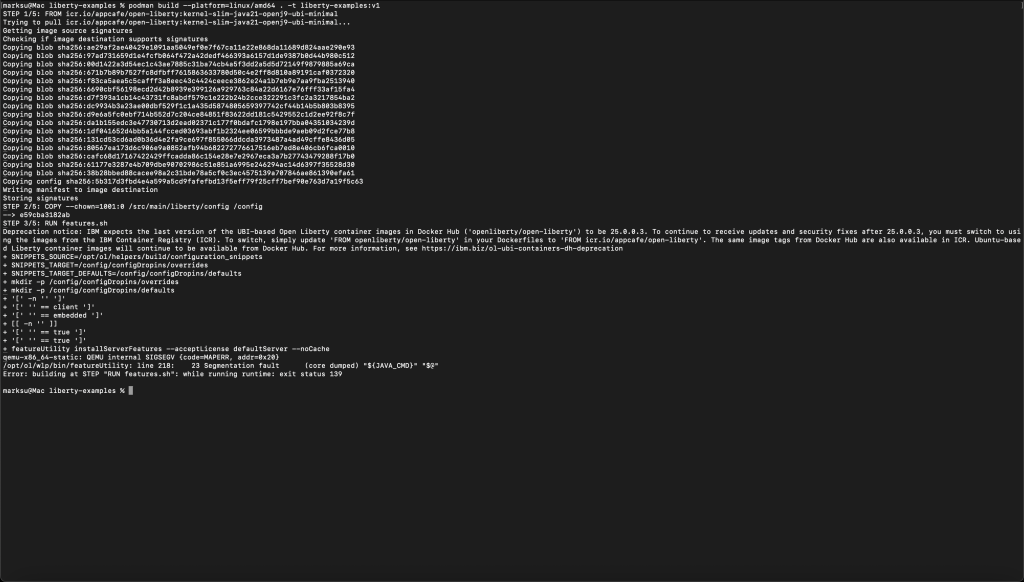
下圖是在我的 Macbook Pro M3 建置一個 open liberty linux/amd64 image 的結果(使用 podman 版本 5.6.0),可以看到最後在執行 RUN feature.sh 失敗:
綜合 google 搜尋結果以及 ChatGPT 的建議,解法如下:
- 用 x86 架構的電腦進行建置:這部分一定沒問題,我也在 MacBook Pro 2019 測試過了,linux/amd64 image 可以順利建置完成;而且 x86 架構的 MBP 就算改建置 linux/arm64 image 也可以正常完成(使用相同版本的 podman)。
- 改用 HotSpot 版本的 JVM:這個選項讓我有點訝異,因為 open liberty 除了 Java8(而且是 IBM Java,不是 openJDK)之外,並沒有官方版本的 HotSpot image;既然沒有官方版本(沒有 RUN features.sh),也暫時就不嘗試這個選項。
- 使用 buildx 而非 build 來建置 image:buildx 這個功能在 docker 是有的,可以一次建立相同應用在各種不同平台的 image;podman 也有 buildx,不過跟 docker 不一樣,在 podman 的 buildx 是 build 的一個 alias 而已。
目前看起來 podman 在 arm 平台上要建立 linux/amd64 的 image 是有問題的,反倒是在 x86 架構要建置 linux/arm64 的 image 沒有問題;而 docker 則是兩邊都沒有問題,podman 真的要加油了。











Add comment